Instagram Now Lets You Add Affiliate Links Directly to Reels — Here's Exactly How to Set It Up

If you've been doing affiliate marketing on Instagram, you know the pain. Film a Reel, mention the product, then pray that people actually go to your bio, find the right link, and click through before they forget what they saw. The entire funnel depended on the words "link in bio" — and let's be honest, most people never make it there.
That just changed. Instagram now lets creators add affiliate links directly to Reels. Not in the bio. Not in a story sticker. Inside the Reel itself — the same way TikTok Shop lets you tag products in videos.
Adam Mosseri announced the feature on Instagram alongside the @Creators account, and it's rolling out now. Here's everything you need to know as a creator, and exactly how to set it up.
What Changed and Why It Matters
Previously, Instagram kept affiliate links at arm's length. You could put them in your bio (one click away from your content), in story link stickers (which disappear after 24 hours), or hope that a comment with a link would get seen. The actual Reel — the piece of content doing all the selling — couldn't link to anything.
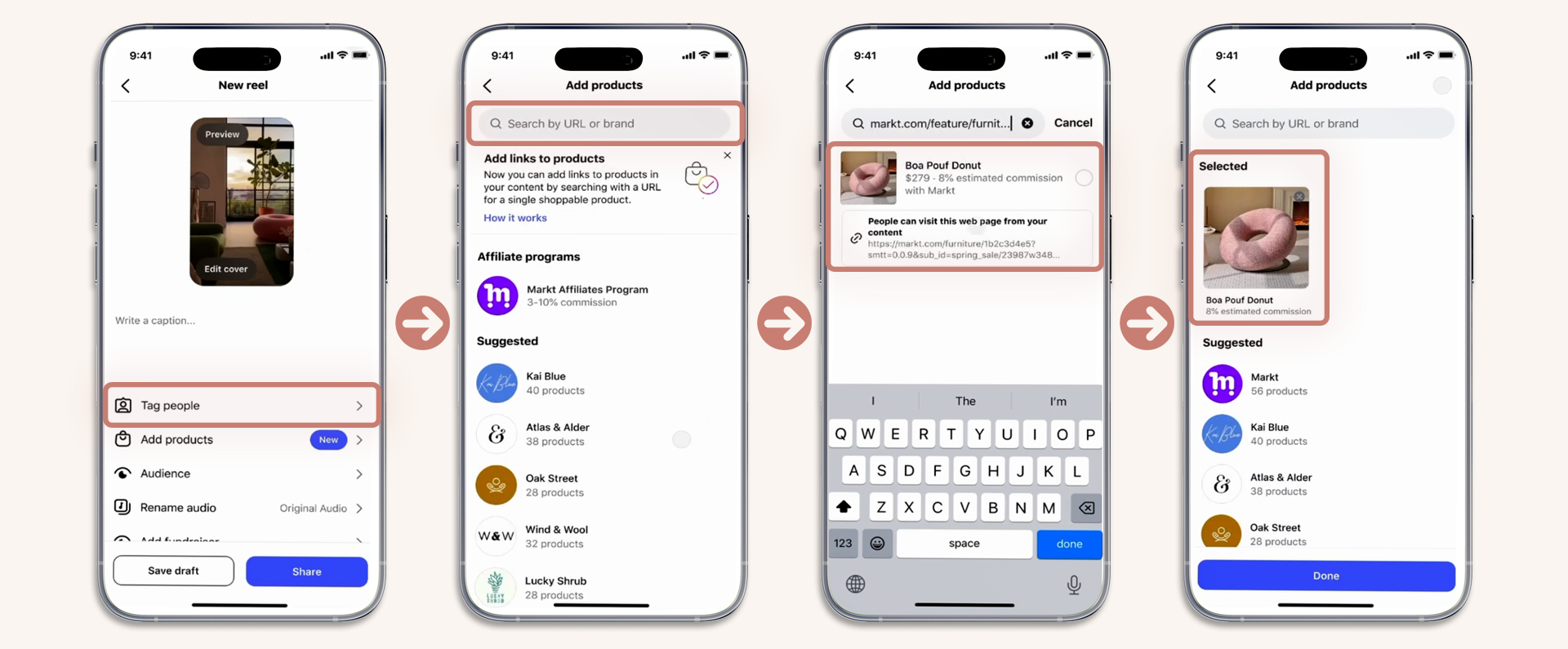
Now, creators can add product links using the "Add products" option when publishing a Reel. The product appears as a shoppable tag that viewers can tap to visit the product page directly. You can add up to 30 different products per single Reel.
This is Instagram's most direct answer to TikTok Shop yet. The difference: instead of building an entire in-app marketplace, Instagram is letting creators use their existing affiliate links from any program — Amazon Associates, brand-direct affiliate programs, or any URL you have a commission agreement for.
This feature isn't available to all users yet
Instagram is rolling out affiliate links in Reels gradually. Not everyone has access yet — if you don't see the "Add products" option, you're not eligible at this time. Sign up below and i'll notify you as soon as it's available for your account.
How to Add an Affiliate Link to Your Reel
See It in Action
Here's a walkthrough of the full process — from the publish screen to the product appearing in the Reel:
Instagram vs. TikTok Shop — How Do They Compare?
The obvious comparison is TikTok Shop, which has been dominating creator commerce for the past two years. Here's how the two stack up:
| Feature | Instagram Reels | TikTok Shop |
|---|---|---|
| Products per video | Up to 30 | Varies (typically 1-5) |
| Link type | Your own affiliate URLs | TikTok Shop product links |
| Marketplace | No (links to external sites) | Yes (in-app checkout) |
| Supported retailers | Amazon, Temu, eBay + any URL | TikTok Shop sellers only |
| In-app checkout | No (redirects to retailer) | Yes |
| Commission tracking | Via affiliate program | Built-in dashboard |
| Content lifespan | Permanent (Reels don't expire) | Algorithm-dependent |
The key advantage for Instagram: you're not locked into a single marketplace. You can use Amazon links, brand-direct affiliate links, or any commission URL you have. TikTok Shop requires the product to be listed on TikTok's own marketplace. Instagram lets you link to anything.
The key advantage for TikTok: in-app checkout. The buyer never leaves the app, which typically means higher conversion rates. Instagram redirects to the external retailer's site, adding friction to the purchase.
What This Means for Creators
The "link in bio" era is officially ending
Services like Linktree, Beacons, and even custom link pages (like the one you're reading this on) were built to solve a problem that Instagram is now solving natively. Your link page is still valuable for organizing all your products, but the primary conversion path just moved from bio → link page → product to Reel → product. That's one less step, which means higher conversion rates.
Multi-platform affiliate strategies just got easier
If you're already running TikTok Shop affiliates, you can now use the same products (or their Amazon equivalents) on Instagram. Different audience, different algorithm, same commission. Creators who are already building content for one platform can now repurpose across both with shoppable links on each.
Micro and nano creators benefit the most
Previously, smaller creators struggled to convert followers because the bio link funnel was too many steps. Now, a Reel with 10,000 views and a directly tappable product link will convert better than a Reel with 100,000 views and a "link in bio" caption. The playing field just leveled significantly.
Even with native product tagging, you still need to disclose affiliate relationships. Add #ad or #affiliate to your caption, or include "affiliate link" in your on-screen text. Instagram's native tagging doesn't replace disclosure requirements.
How to Maximize This Feature
- Show the product in use within the first 3 seconds. The product tag is useless if people scroll past. Hook them visually with the product immediately.
- Don't overload with 30 products. Just because you can doesn't mean you should. One to three focused products per Reel will outperform a Reel stuffed with links.
- Use both TikTok Shop AND Instagram affiliate links. Same content, two platforms, two income streams. Repurpose your best-performing TikTok videos as Reels with affiliate links.
- Track which products convert. Use your affiliate dashboard to see which Reels drive actual sales, not just clicks. Double down on what converts.
- Keep your link page updated too. Not everyone will buy from the Reel — some will still visit your bio. Make sure your link page has the same products with working links.
Which Affiliate Programs Work Best
Instagram's product search supports any URL, but some programs integrate more smoothly than others. Based on early testing, here's what's working:
| Program | Commission | Best For |
|---|---|---|
| Amazon Associates | 1-10% | Widest product catalog, high trust with buyers |
| TikTok Shop (via IG) | 5-20% | K-beauty, trending products, higher commissions |
| Brand-direct programs | 10-30% | Higher commissions, exclusive codes, deeper partnerships |
| ShareASale / Impact | Varies | Access to thousands of brands through one platform |
Key Takeaways
- Instagram now lets you add affiliate product links directly inside Reels — no more "link in bio" dependency
- You can add up to 30 products per Reel using any affiliate URL
- The feature launched with Amazon, Temu, and eBay support, with more retailers coming
- This directly competes with TikTok Shop but with more flexibility on which retailers you can link to
- Creators who already do TikTok Shop should immediately start using this on Instagram for dual-platform monetization
- FTC disclosure is still required — add #ad or #affiliate to your content
Frequently Asked Questions
Yes — as of April 2026, Instagram lets creators add shoppable affiliate links directly inside Reels using the "Add products" option on the publish screen. No more relying on "link in bio."
Up to 30 different products per Reel. Though for conversion, focusing on 1-3 products per video tends to perform better than stuffing all 30.
Yes. Instagram supports Amazon Associates, Temu, eBay, and any other affiliate URL. Unlike TikTok Shop, you're not locked into a single marketplace.
Similar concept, different execution. TikTok Shop has in-app checkout (buyer never leaves). Instagram redirects to the retailer's site. Instagram's advantage is you can use any affiliate URL, not just products listed in a marketplace.
No. The feature is rolling out to creator and business accounts. Micro and nano creators actually benefit the most — a direct product link converts better than "link in bio" regardless of audience size.
This is the biggest change to Instagram's monetization model since they launched the creator fund. If you're doing affiliate marketing on any platform, set this up today — the creators who move first will build the playbook everyone else copies.
This article is for informational purposes. Some links on this site are affiliate links — if you purchase through them, I may earn a small commission at no extra cost to you.