Tutorial
How to Tag Amazon Products in Instagram Reels — Affiliate Link Walkthrough

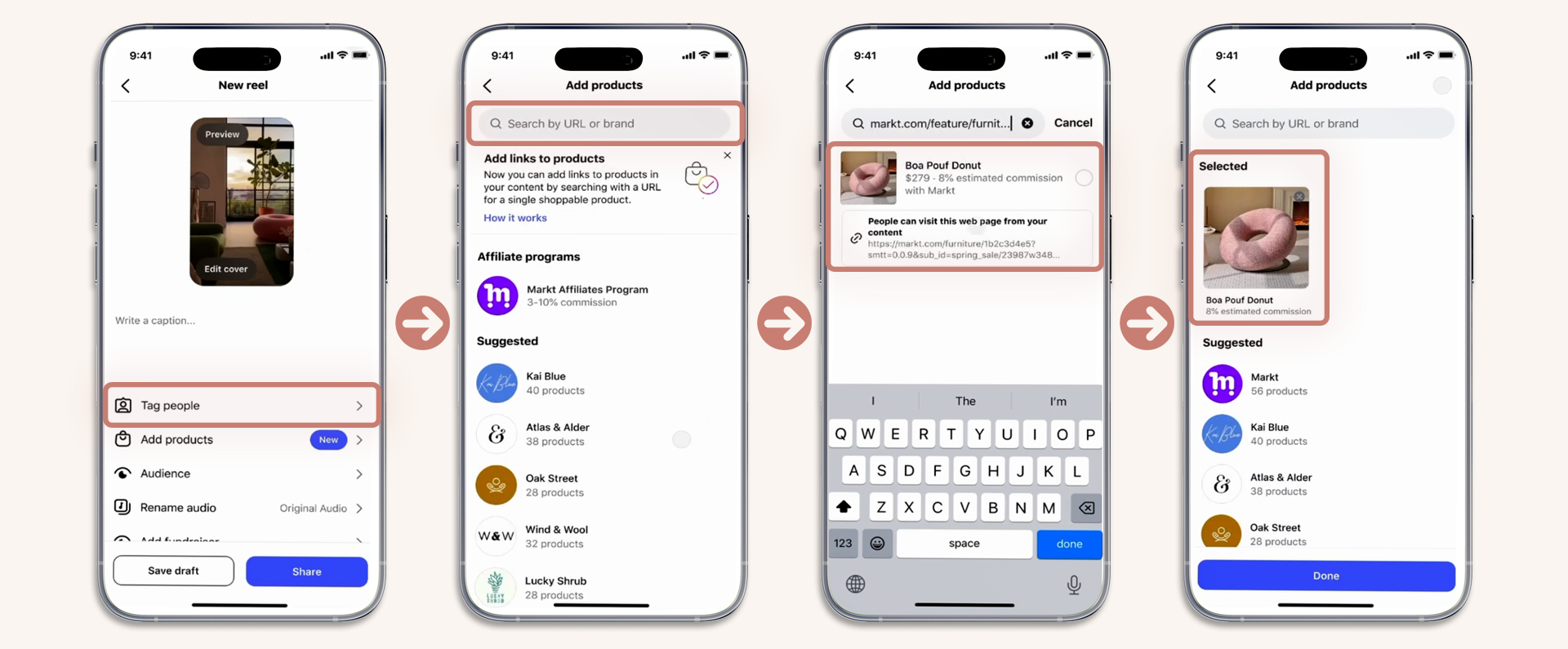
Amazon Associates is the most popular affiliate program on the planet, and it now works natively with Instagram's "Add products" feature in Reels. Here's exactly how to connect the two.
Step-by-Step: Amazon Product in Your Reel
1
Get your Amazon affiliate link
Log into Amazon Associates (affiliate-program.amazon.com). Find the product you want to promote. Use the SiteStripe toolbar or the link generator to create your affiliate URL. You'll get a link like amzn.to/XXXXXX or a full amazon.com URL with your tracking tag.
2
Create your Reel featuring the product
Film a review, demo, or recommendation video. The key: show the actual product in the video. Instagram wants the tagged product to match what viewers see.
3
Tap "Add products" on the publish screen
Below "Tag people" you'll see "Add products." Tap it to open the product search.
4
Paste your Amazon affiliate link
Paste the full Amazon URL or the amzn.to short link into the search bar. Instagram will detect the product and display it with the product image, name, and price.
5
Select and publish
Tap the product to add it. Hit "Done" then share your Reel. The product now appears as a tappable tag.
Which Amazon Links Work Best?
| Link Type | Works? | Recommendation |
|---|---|---|
| amzn.to short links | Yes | Best option — clean and trackable |
| Full amazon.com URL with tag | Yes | Works but longer — use if short link fails |
| Amazon search result URLs | No | Must link to a specific product page |
Amazon Commission Rates by Category
| Category | Commission |
|---|---|
| Luxury Beauty | 10% |
| Fashion, Shoes | 4% |
| Home, Kitchen | 3% |
| Electronics | 1-3% |
| Health & Personal Care | 1-4.5% |
Pro tip: Amazon's 24-hour cookie means you earn on everything the person buys within 24 hours of clicking your link — not just the product you tagged. Someone clicks your $15 serum link but also buys a $200 kitchen appliance? You earn commission on both.
This article is for informational purposes. Some links on this site are affiliate links.