Instagram 'Add Products' Not Showing? Here's Why and How to Get Access

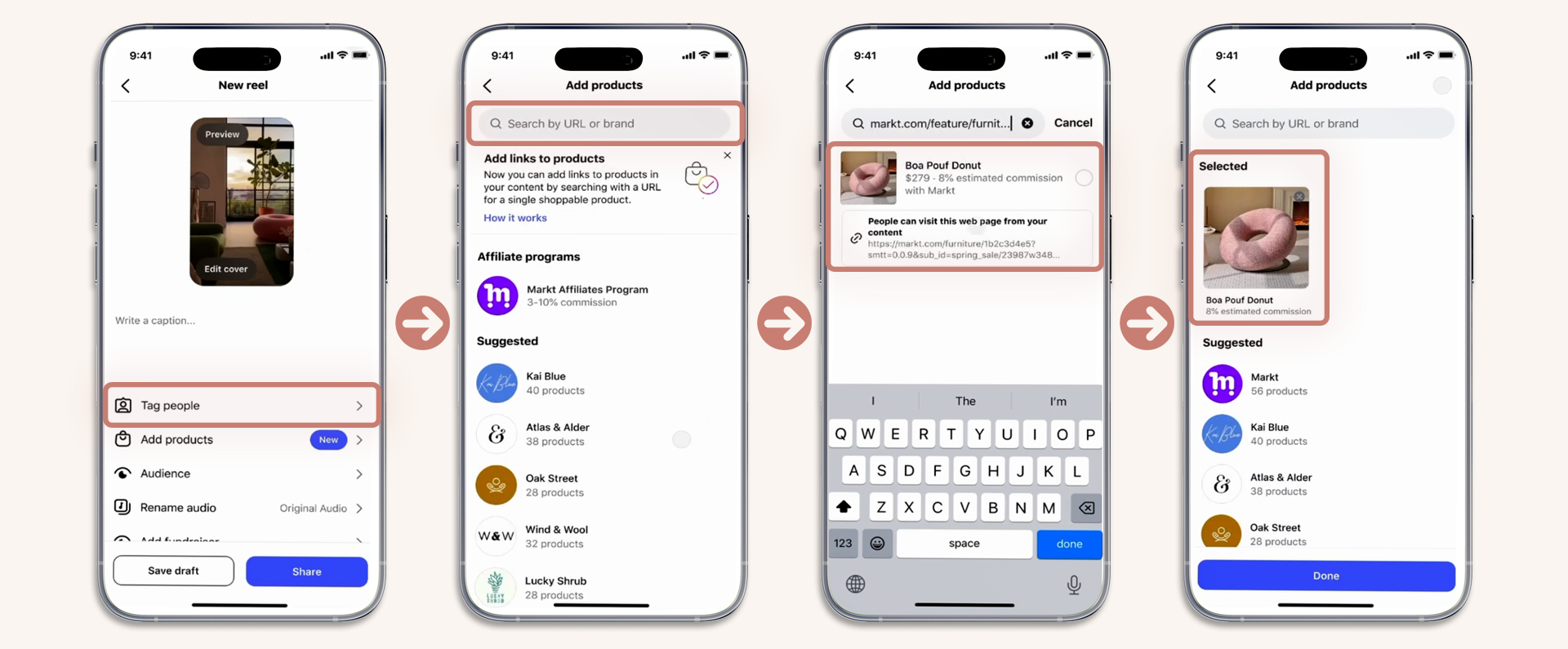
You've heard about Instagram's new affiliate link feature for Reels. You go to publish a Reel. You look for "Add products" below "Tag people." It's not there.
You're not doing anything wrong. Here's what's happening and what you can do.
Why You Can't See "Add Products"
Instagram announced the affiliate link feature in late March 2026 and is deploying it in waves. Not every account has access yet. Meta typically rolls out new commerce features to a small percentage of accounts first, then expands over weeks to months.
Checklist: Make Sure You're Eligible
What to Do While You Wait
The feature will reach your account eventually. In the meantime, these methods still work for monetizing your Reels:
- Link in bio — set up a curated link page with all your affiliate products and mention it in your captions
- Story link stickers — post your Reel to your Story with a link sticker pointing to the product
- Comment-to-DM automation — use tools like ManyChat to auto-send product links when someone comments a keyword
- Promo codes — if you have discount codes from brands, these work in captions without needing clickable links
When the "Add products" button does appear on your account, you'll see it on the Reel publish screen below "Tag people." No notification — just check each time you post.
Keep Creating Content Now
Don't wait for the feature to start making affiliate content. Build your audience, test which products resonate, and have a library of product Reels ready. When access arrives, you'll be ready to tag products on day one while others are still figuring out what to post.
This article is for informational purposes. Some links on this site are affiliate links.